Hey there,👋I am

Georg Straßberger

Software developer

Foto von Georg Strassberger

I love not only developing systems, but also understanding, automating, and optimizing them—from web apps to sensor data analysis.

Currently, my focus is increasingly shifting toward containerization (Docker, k3s) and scalable infrastructures, while I continue to use modern web technologies to turn ideas into working solutions.

I love it when something works and is practical in the end—and I'm constantly learning new things in the process.

Contact me

My skills

html_logoHTML

How I use it

  • Structured layouts with semantic HTML
  • Fast-loading, accessible pages
  • Forms, menus, and interactive sections that just work
html_logoCSS

How I style it

  • Modern layouts with Flexbox and Grid
  • Simple, consistent styles that just work
  • Smooth animations and transitions
html_logoStatic Site generator

How I build with it

  • Custom static sites with React
  • Search, tags, and i18n configuration
  • Flexible layouts and content structure
html_logoPython

What I build with Python

  • IoT Microcontroller
  • Prototyping CLI tools and security utilities
  • APIs with Flask/Django
  • Lightweight automation scripts and system tooling
html_logoShell scripting

How I automate with shell

  • Writing entrypoint.sh to start and configure docker
  • Adjusting config files (e.g. permissions, variables, services)
  • Automating deployment and runtime setup on Linux systems
html_logoYaml

How I use YAML

  • Kubernetes deployments and services in YAML
  • Storing configuration values such as database connections and credentials
  • Managing environment-specific variables for different stages (dev, test, prod)
html_logoContainer

How I work with containers

  • Building and running services in containers (Docker)
  • Managing lightweight clusters and workloads with k3s
  • Using containers in deployment and automation workflows
html_logoCI/CD with GitHub Actions

How I implement CI/CD

  • Automating builds, tests, and deployments through CI/CD pipelines
  • Running pre-build and validation steps for consistent results
  • Triggering workflows on push, pull requests, or scheduled events
html_logoIT Security

How I apply security

  • Simulating attacks to identify and understand vulnerabilities
  • Hardening login and access control mechanisms
  • Using security tools to analyze configurations and permissions

My projects

vServer

yaml_iconShell
html_iconHTML
css_iconCSS
vServer
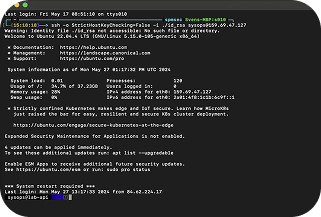
vServer Setup Guide is a hands-on tutorial for setting up your own virtual server. It walks you through creating a secure SSH connection, configuring an Nginx web server, and integrating GitHub for deployments. The guide covers common tasks such as user management, permissions, and SSL setup. It’s designed for beginners who want to build and manage their own development or testing environment – with examples for both Linux and Windows.

Baby Tools Shop

yaml_iconShell
python_iconPython
yaml_iconContainer
BabyToolsShop
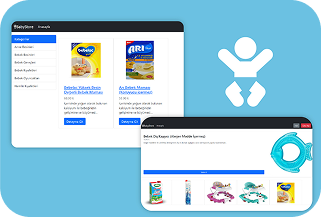
Baby Tools Shop is a sample project demonstrating how to build, containerize, and deploy a Django web application using Docker. The repository includes a complete step-by-step guide for creating the Docker image, running the containers, and managing the app through the Django admin interface. The goal was to create a scalable and reproducible setup that can easily be adapted to different systems – ideal for learning purposes and small web projects.

Truck Signs API

yaml_iconYaml
shell_iconShell
python_iconPython
container_iconContainer
Wordpress
Truck Signs API is a Django-based web application serving as the backend for an online shop offering truck decals — both pre-made and custom designs. The project demonstrates how to build a containerized application using Docker, consisting of a PostgreSQL database, a Django REST API, and an admin dashboard for managing products and orders. The goal was to create a modular, maintainable, and reproducible infrastructure that can easily run both locally and on a server.

Minecraft

yaml_iconYaml
shell_iconShell
docker_iconContainer
Minecraft
Minecraft Server Hosting (Java Edition) is a fully Docker-based server setup built without using pre-made images. The server is generated directly from Mojang’s official server.jar using its SHA1 hash, ensuring full transparency and control. All settings — such as version, ports, memory limits, and whitelist — are configured centrally via an .env file. The project serves as a template for running a Minecraft server in containers that is automated, reproducible, and secure.

Wordpress

yaml_iconYaml
shell_iconShell
docker_iconContainer
Wordpress
WordPress Docker Example is a simple Docker Compose project that demonstrates how to run a complete WordPress environment inside containers. The setup includes WordPress, a MariaDB database, and the Adminer interface for database management. All key parameters such as users, passwords, and ports are configured via environment variables. The project serves as an easy-to-use template for hosting and testing WordPress instances in an isolated container environment.

Conduit

yaml_iconYaml
shell_iconShell
docker_iconContainer
Conduit
Conduit is a complete full-stack web application featuring an Angular frontend and a Django backend, fully deployed in Docker containers. The project demonstrates how multiple services – frontend, backend, and database – can be orchestrated using Docker Compose. This separation of components provides a clean, modular architecture that is easy to extend, test, and deploy across different environments. Conduit serves as a practical example of modern web development with a containerized infrastructure.

Juice Shop

yaml_iconShell
yaml_iconIT Security
Wordpress
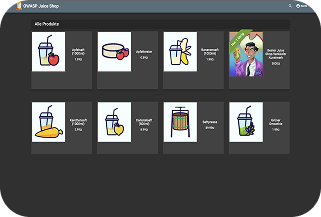
OWASP Juice Shop is an intentionally vulnerable web application created for learning and testing purposes in the field of web security. In this project, I run Juice Shop in an isolated environment to explore security mechanisms, vulnerabilities, and attack vectors in a realistic setup. Docker containers and shell scripts are used to automate the setup and reset process completely. The project serves as a hands-on platform to practice penetration testing, security analysis, and hardening techniques.

Contect me

When reaching out, please include information such as:

  • Feel free to reach out with job offers or apportunities like.
  • What robe are you looking for?
  • How you will contribute to the new team.
  • Are you open for remote work or even relocate?